Automatic checksum
Every file you save is checksum-corrected, so it flashes straight to the ECU. No extra tool, no manual step.
CARTESIAN checks every solution against the file and writes a correct checksum; it does not touch a file it is not sure of. In a few clicks, without risking the control unit.
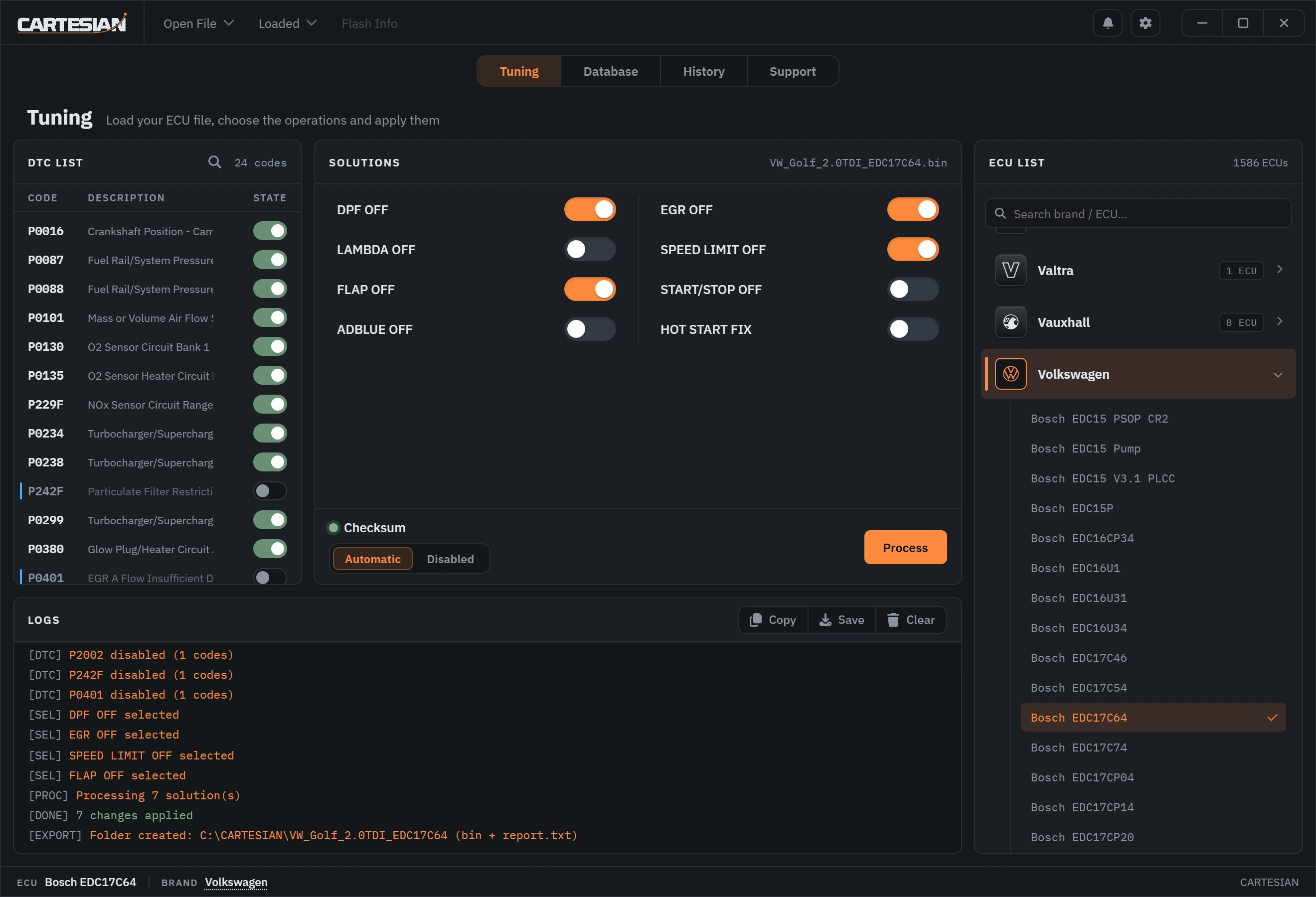

Tuning, Database, History and Support: the app's tabs, in the same order.
Open the file: CARTESIAN recognises the control unit and lists the solutions and fault codes it can apply.
Search the original file archive by make, ECU, hardware or software number, or give it your file and the closest originals are suggested by their content.
Each job is written to History with the original and the result: find it again and download it again.
Open a file request or ask a question: the answer arrives in the app, as a notification and by e-mail.
Support spans 106 vehicle brands, from passenger cars to commercial and agricultural. Search the list below by brand or control unit; new units are added every week.
Need a specific control unit or software version? Ask us. New units are added on request.
Brand names and logos belong to their owners and are shown only to identify the brand.
CARTESIAN checks for a new version each time it starts and installs it, so new control units, solutions and fixes reach you without reinstalling anything.
Only days with updates are shown: each tile is one such day; the darker it is, the more updates went out, and the number says how many.
CARTESIAN finds maps, fault-code tables and checksum blocks from the structure of each file. Reads from different tools and methods land in the same place, and nothing is written until it checks out.
A focused desktop tool that reads the file, applies the solution and hands you a file that flashes straight.
Every file you save is checksum-corrected, so it flashes straight to the ECU. No extra tool, no manual step.
CARTESIAN never guesses. If a file cannot be solved safely, it tells you clearly instead of risking the control unit.
DPF, EGR, Lambda, DTC and speed-limiter solutions, applied per file and verified against the calibration.
Bench or OBD reads from the tool you already use. Each file is recognised by its content, not by the tool that made it.
Frequent updates add control units and refine solutions. Your copy stays current automatically.
Search originals by make, ECU or part number, or with your own file. OEM flash files for VAG, Ford/JLR, Toyota and FCA, converted to BIN.
Immobiliser off for supported control units, with the checksum corrected in the same step.
Turn a modified file back into its original from the archive, so a car can always be returned to stock.
The whole app in Turkish, English, Spanish, Portuguese, German, French, Italian, Russian, Polish and Arabic.
A wrong byte can brick an ECU. CARTESIAN is engineered around one rule: be exact or do nothing. Solutions are derived from the calibration itself and checked before they are written.
Choose by daily file allowance and tools. Each plan includes everything in the plans below it, plus the items listed.
€570 Annual renewal
Most popular
€980 Annual renewal
€1600 Annual renewal
Prices are per licence, for one machine. Contact us about workshop and reseller options.
CARTESIAN is a Windows application. Download it, open it and create your account with your e-mail address.
Get the latest version for Windows 10 and 11.
DownloadOpen CARTESIAN and create your account with your e-mail address. Send that address to your distributor: your licence is created for it and CARTESIAN opens.
See plansOnce your licence is ready, the full workspace unlocks. Updates arrive automatically.
See featuresNo. Open the ECU file, switch on the solutions you need and save. CARTESIAN finds the maps, fault-code tables and checksum blocks itself and applies each change for you: no hex or map editing.
Yes, automatically, on every file you save. The file is ready to write to the ECU with your own tool; no separate checksum tool or manual step is needed.
CARTESIAN never guesses. Each solution is checked against the file before it is applied; if a change cannot be made exactly, it tells you clearly and writes nothing, instead of risking the control unit.
Any. Bench, boot or OBD reads from the tool you already use: each file is recognised by its content, not by the tool that made it, and you write the saved file back with the same tool.
1602 control units across 106 brands, from passenger cars to commercial and agricultural vehicles. Search the coverage list on this page; new units are added every week, and on request.
Depending on the file: DPF, EGR, AdBlue, Lambda, flaps, start/stop, speed limiter and hot start fix, fault codes one by one by name, and IMMO OFF on supported control units. CARTESIAN lists only what the opened file supports.
Yes. CARTESIAN can turn a modified file back into its original from the archive, and History keeps the original of every job you process, so a car can always go back to stock.
Original files for a wide range of vehicles and the OEM flash files of VAG, Ford/JLR, Toyota and FCA, with VBF, FRF, SGO and CUW files converted to BIN. Search by make, ECU or part number, or give it your own file and the closest originals are suggested. Your plan sets how many original files you can download a day.
Several times a week: new versions add control units and refine solutions, and the app installs each one itself when it starts. The Updates section on this page shows the real figures.
No. CARTESIAN has simple annual plans with a daily file allowance instead of per-file credits; the larger plans add tools such as OEM file conversion and the checksum module. Pricing shows what each plan includes.
Per machine, on an annual plan. Your licence is created for your e-mail address; sign in to CARTESIAN with it and the machine is tied to that licence.
A Windows 10 or 11 PC and an internet connection. CARTESIAN works with the files your read tool produces; it does not replace your read tool.
From the Support tab in the app: ask a question or open a file request, for example an Eco or Stage 1 to 3 file or a control unit that is not covered yet, with your files and photos attached. The answer arrives in the app, as a notification and by e-mail, and we reply in all ten languages of the app.
The whole app is available in ten languages: Turkish, English, Spanish, Portuguese, German, French, Italian, Russian, Polish and Arabic.
No. Switching off a code only stops the control unit from reporting it; the part itself is not repaired. Use it for codes of equipment that has been removed, and repair real faults first.
It depends on the country and on how the vehicle is used: in many countries a vehicle may not be driven on public roads after such a change. These functions are meant only for uses the law allows, such as motorsport on closed courses, machines used off public roads or vehicles exported where the change is permitted. The workshop decides and is responsible.
Questions, a licence, or a control unit you need added? Reach out and we will get back to you.
We reply in all ten languages of the app.